

How to Connect the Claude Code to AWS Bedrock via the terminal
This guide shows how to configure the terminal instance of Claude Code to use your secure AWS Bedrock endpoint instead of the public Anthropic API.
Prerequisites
Section titled “Prerequisites”- Node version
20.19or higher - An AWS account
- Access to Claude models (e.g.,
Claude 4.5 Sonnet) enabled in your AWS Bedrock console - AWS credentials configured locally. The simplest method is to install the AWS CLI and run
aws configurebut check with your IT/infrastructure team. Claude will automatically find these credentials once configured to use Bedrock.
Step 1: Install the Claude Code for VS code Extension
Section titled “Step 1: Install the Claude Code for VS code Extension”- Open your terminal
- Run
npm install -g @anthropic-ai/claude-code
Step 2: Add the Bedrock Configuration to Claude Code settings.json
Section titled “Step 2: Add the Bedrock Configuration to Claude Code settings.json”⚠️ Please validate that your AWS credentials are configured before proceeding ⚠️
- Navigate to
~/.claudeand create a new file:settings.json - Add the following JSON block to your
settings.jsonfile
{ "env": { "CLAUDE_CODE_USE_BEDROCK": "1", "AWS_REGION": "us-west-2" }}Step 3: Verify the Bedrock Connection
Section titled “Step 3: Verify the Bedrock Connection”- Reload or restart the terminal to apply the new settings.
- Initilize Claude Code with the command
claude - Claude Code should initialize without asking for an API key or login.
- In the chat input, use the command “/Status” to validate your connected to AWS Bedrock. It should look something like this:
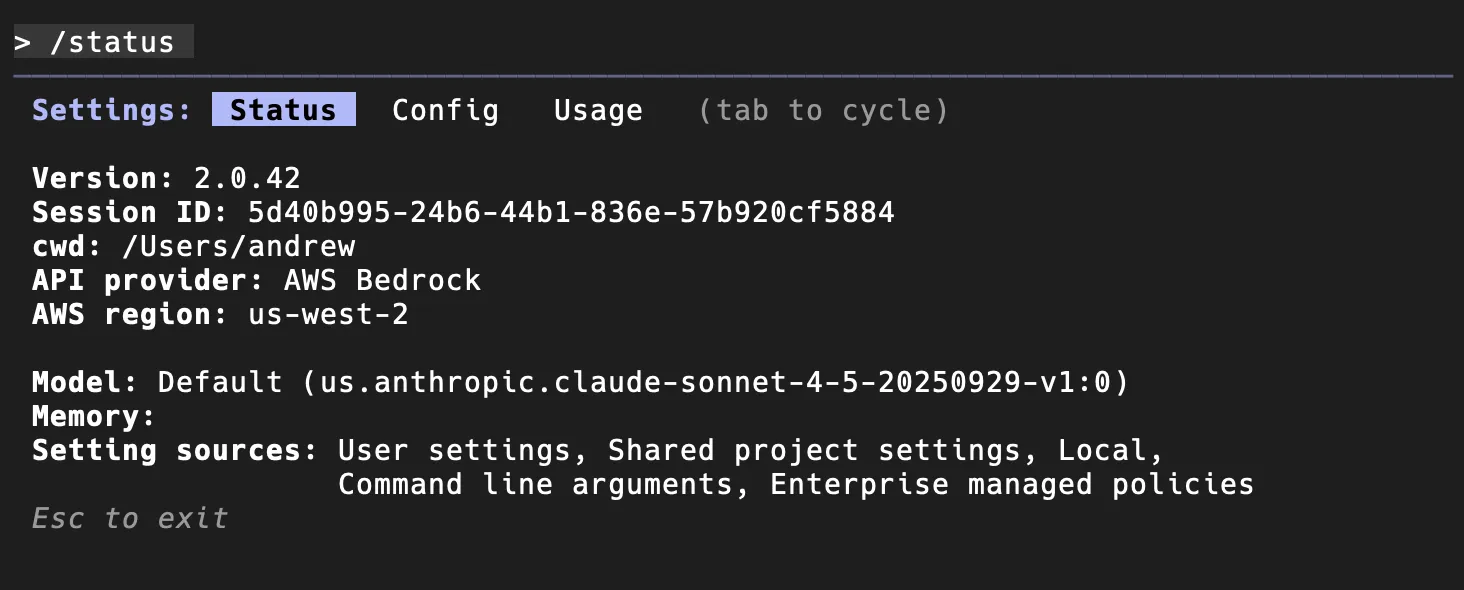
- Finally, press
escto revert back to the chat interface. Try a prompt out to validated the connection.
If you get a response, you are successfully connected. Claude is now using your local AWS credentials to send all requests securely to your AWS Bedrock endpoint.
Further Reading
Section titled “Further Reading”- Official Claude Documentation
- Claude Code & AWS Bedrock configuration
- A detailed Medium post with additional debugging tips and strategies